
PHONE GUIDES
Get to know your phone
Your WP826 uses Wi-Fi for calls. The charging cradle supplies power; it does not provide the phone’s network connection.
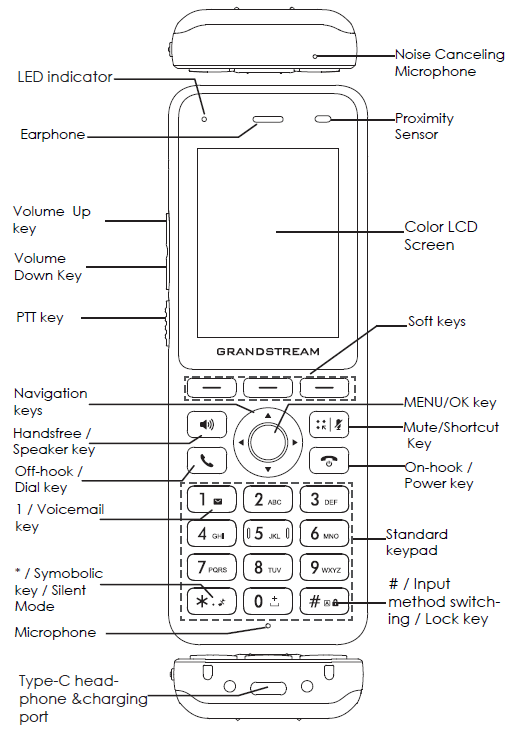
The buttons you will use most
Menu/OK opens the menu and selects the highlighted item. The arrow keys move through lists. The three buttons under the screen choose the labels above them.
Dial starts or answers a call. On-hook ends it. The separate Speaker and Mute keys control hands-free audio and your microphone.
Charge your phone
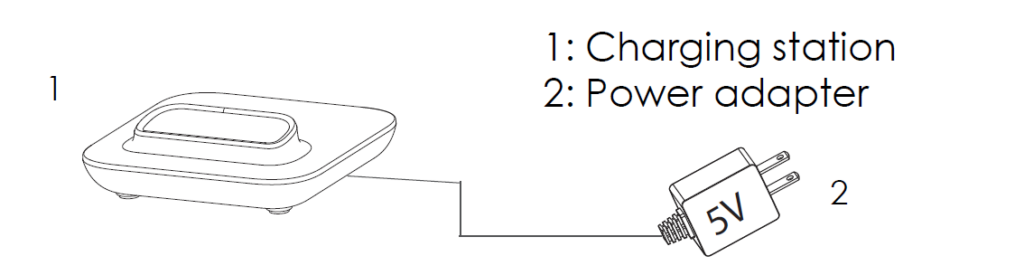
- Connect the charging cradle to power using the supplied adapter.
- Sit the handset securely in the cradle. Check that the battery indicator shows it is charging.
- If it does not charge, reseat it and check the cradle’s power connection.
Check you are ready
Look for Wi-Fi signal and battery indicators at the top of the display. A Wi-Fi connection alone does not mean your extension is connected: if calls fail or the account shows offline, open the troubleshooting guide.