
USER PORTAL
Voicemail
Applications → Voicemail
The Voicemail page allows you to retrieve voicemail messages, upload greetings, and adjust various settings

On the main Voicemail page, your voicemails will be displayed. The following options are provided:

Play the voicemail through your computer

Download a local copy of the voicemail on your computer

View the text transcription of the voicemail, if applicable
Greetings

The Greetings page allows you to upload a voicemail greeting directly from your computer. WAV formats are supported. Simply click ADD, and browse your computer for the appropriate file. Then press UPLOAD.
Select the greeting you want to use by filling in the bullet under “Selected”.
Settings
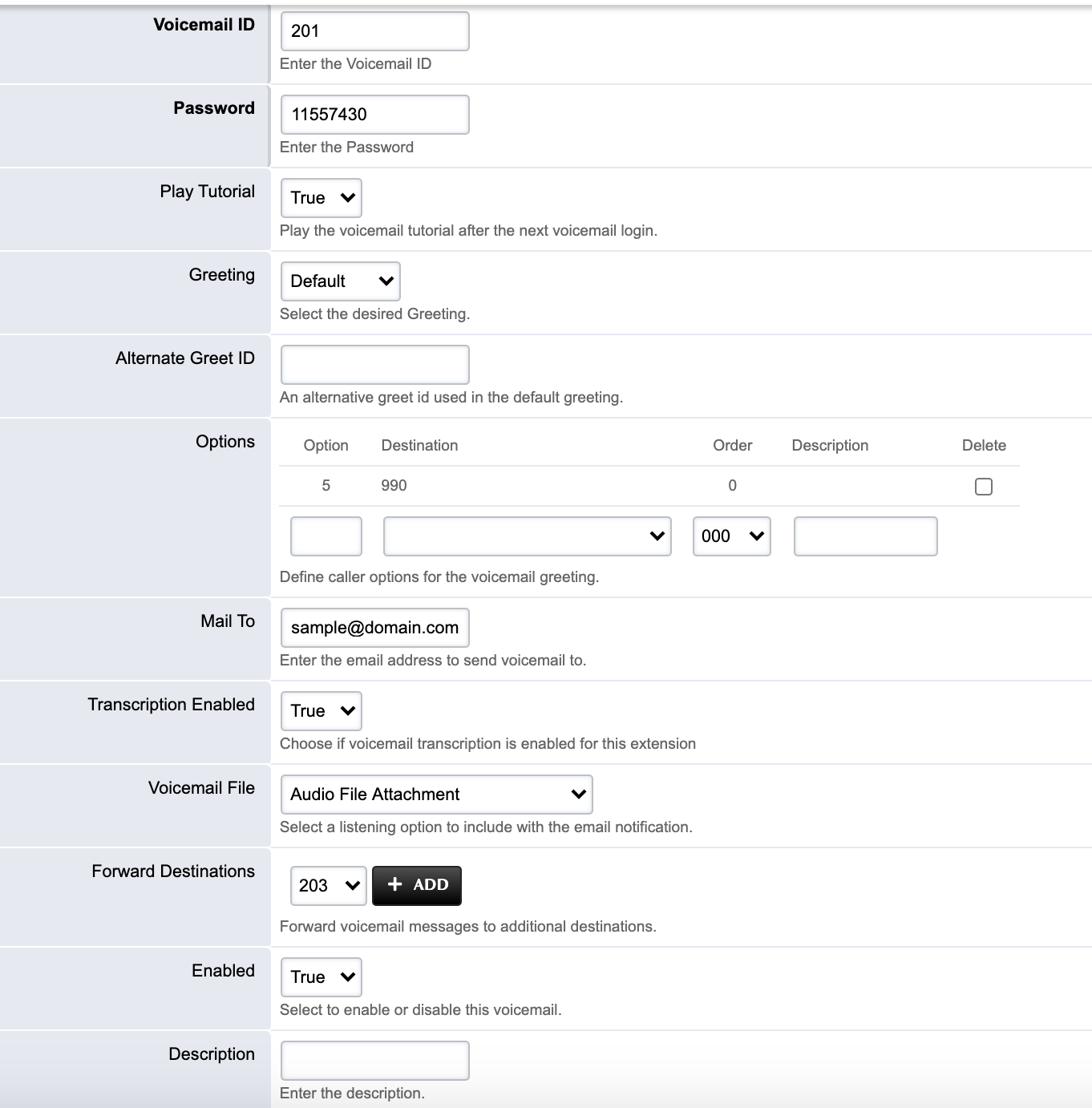
The Settings page allows you to modify some advanced settings
Password: PIN to access your voicemail remotely, or if password protection is enabled.
Greeting: In addition to being able to select your active voicemail greeting from the Greetings page, you are also provided with a dropdown to quickly change the active voicemail greeting.
Alternate Greet ID: If you selected Default for your voicemail greeting, you can have the system read back an alternate extension or phone number instead of your voicemail extension number. (Example: by default, callers will hear, “The person at extension 201 is unavailable”. If 5543 is entered for the Alternate Greet ID, callers will hear, “The person at extension 5543 is unavailable”.
Options: Callers can press a button on the keypad while listening to your voicemail greeting to exit the voicemail system and get transferred elsewhere. In the provided example, if a caller presses option 5 while listening to the voicemail, they will be transferred to x990.
Mail To: The E-Mail address to deliver a copy of the voicemail.
Transcription Enabled: If applicable, the ability to enable or disable voicemail transcriptions.
Voicemail File: The ability to remove the voicemail audio file from the voicemail to email.
Enabled: Ability to Enable/Disable your extension’s voicemail.
Article attachments 12
- image-20201001-025623.png
- image-20201001-025811.png
- image-20201001-025825.png
- image-20201001-025849.png
- image-20201001-030002.png
- image-20201001-030023.png
- image-20201001-030057.png
- image-20201001-030119.png
- image-20201001-030155.png
- image-20201001-030547.png
- image-20201001-031233.png
- image-20201001-031504.png


